
Smart Web Export · SketchUp
Your SketchUp model,
in 3D on a simple link
Publish the model open in SketchUp, in a few seconds, with the Smart Web Export extension. Your client opens it on a phone, turns it, measures it and places it in the room in augmented reality. Without SketchUp, without an app, without an account.
Smart Web Export for SketchUp
Version 1.3.0 · 1.4 MB · SketchUp 2017 or later, Windows and macOS
First link without an account Publish in one click, no form: your model is online for 24 hours, with its link and QR code. One trial only; the free account then keeps that link.
Signed extension. In SketchUp: Extensions › Extension Manager › Install Extension. Your first link needs no account (24-hour trial).
The account, risk-free
- Free, no credit card, no commitment.
- It ties your published models to you: only you can edit, pause or delete them.
- An e-mail address and a password. No data resale, no advertising.
Straight from SketchUp
No export to redo, layers and units included.
Your view, as it is
The model opens on your current SketchUp camera.
Your .skp stays with you
Only the published 3D model goes online.
Light files
Measured on the demo model: 10.5 MB down to 1.7 MB.
How it works
From SketchUp to a shared link
Install the extension
Download the .rbz file from this page and install it in SketchUp 2017 or later, on Windows or macOS.
Set up and publish
Frame the view in SketchUp, then in the export window choose the background, the edges, up to six layers your client can hide, measuring and augmented reality. The first time, no account needed: a 24-hour trial link, which the free account then keeps.
Share
A short link and a QR code, to send by e-mail or messaging, or to print on a quote. The extension’s model manager lets you copy them again, update the model or pause it.
On the other side of the link
What your client sees
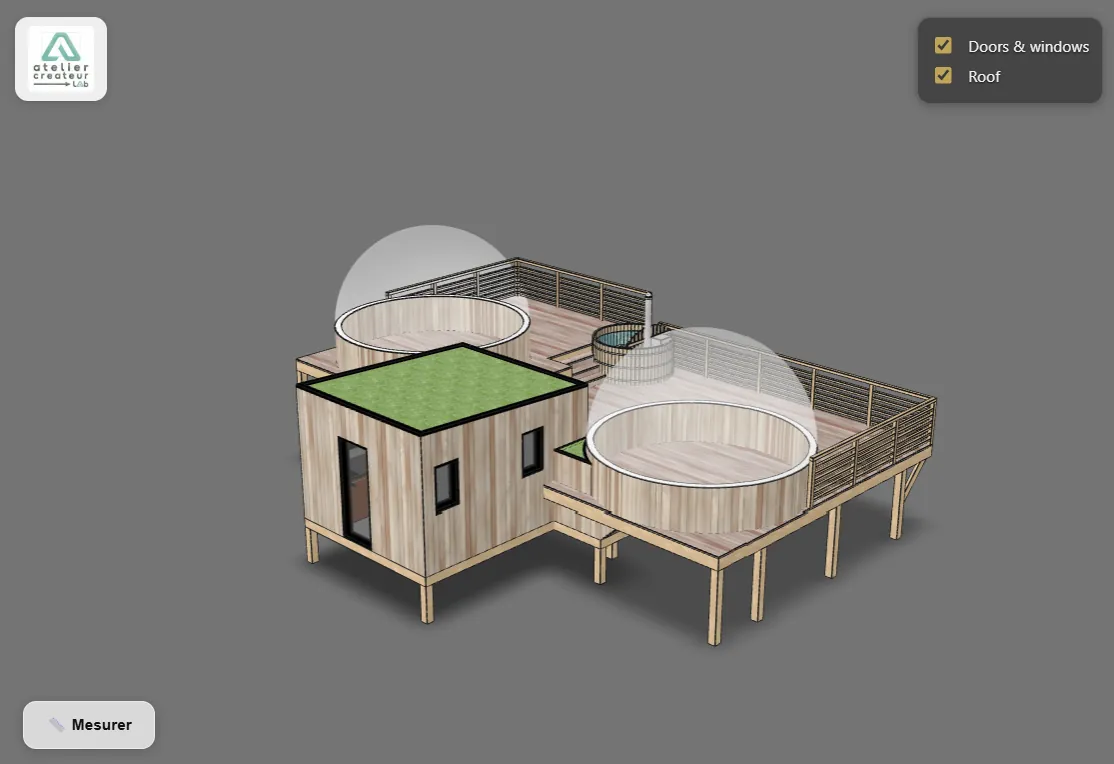
They explore the project alone, at home, at their own pace: they turn around it, hide the roof to look inside, and measure a distance between two points. On a phone, they place the project on the table or in the room, in augmented reality: at real size, or at a size you choose to see a house on a table.
They cannot change anything, and they do not need SketchUp.
SketchUp: what to know
- SketchUp versions
- 2017 or later, Windows and macOS (from 2017 to 2020, publishing finishes in the web browser)
- Opening view
- Your current SketchUp camera
- Layers
- Up to six hideable layers, renamable; you choose which ones are hidden on opening
- Measuring unit
- m, cm, mm, or feet and inches
- Preview
- None in SketchUp: you set things up in the export window. The web preview exists only in the browser, for STEP, IFC, OBJ, STL and GLB files.
- What goes online
- The published 3D model (visible geometry, materials, layer names) and the display settings. Your .skp file is never sent.
- Published size
- Up to 52 MB once converted and compressed
Questions
Does my client need SketchUp?
No. They open the link or scan the QR code in their browser, on a phone, tablet or computer, with no account and no app.
How do I install the extension?
Download the .rbz file from this page, then in SketchUp: Extensions, Extension Manager, Install Extension. The extension is signed: SketchUp recognises it. It is also available on SketchUcation.
Is my .skp file sent to a server?
No. Only the published 3D model goes online, visible to the people you give the link to.
I changed the project. Do I have to send a new link?
No. Update the model from the extension’s model manager: the link and the QR code you already sent keep working. On the free account, the 7 days still count from the first publication.
Is it free?
Yes, to install the extension and publish: the free account, with no credit card, keeps up to 3 models online at a time, each visible for 7 days. An expired link frees its slot: you can publish another one. Paid plans add your logo, a free choice of duration, more models and view counts. The embed code is included from the free account.
What about other formats?
Smart Web Export also handles: STEP viewer, IFC viewer, OBJ, STL and GLB viewer.
Your next project deserves better than a screenshot
Publish it in 3D. Free to start, no credit card.